
Understanding the Azure Cosmos DB Dedicated Gateway: Purpose, Benefits, and When to Use It
Azure Cosmos DB is known for high performance, global distribution, and flexible scaling. For many applications, connecting directly to Cosmos DB using the SDK’s direct mode provides excellent low-latency access to backend partitions. However, as workloads grow, especially read-heavy workloads with repeated queries or point reads, cost and consistency of performance become just as important as raw speed.
That is where the Azure Cosmos DB dedicated gateway comes in.
The dedicated gateway is a managed, server-side compute layer that sits in front of your Azure Cosmos DB account. When your application connects through the dedicated gateway endpoint, requests are routed through dedicated gateway nodes before reaching backend partitions. Most importantly, the dedicated gateway enables the integrated cache, which can serve repeated reads without consuming request units, or RUs.
When To Use It and When Not To
The main purpose of the dedicated gateway is to support predictable performance and cost optimization for read-heavy workloads.
Cosmos DB uses RUs to measure the cost of database operations. Every point read, query, write, update, and delete consumes RUs. For workloads with repeated reads, this can become expensive over time, especially when the same items or query results are requested frequently.
The dedicated gateway helps solve this by enabling the integrated cache. When a read request is served from the integrated cache, the RU charge is zero.
This makes the dedicated gateway especially useful when you have patterns such as an application repeatedly reading the same data and can tolerate a controlled amount of staleness. For example, an e-commerce application may read the same product catalog items thousands of times during a promotion, while the product descriptions and metadata change only occasionally. Similarly, dashboard and reporting workloads often run the same queries repeatedly throughout the day, making them strong candidates for integrated caching.
However, the cache is less effective when the workload is write-heavy, highly random, or requires near-real-time freshness. Examples include IoT ingestion workloads, financial transaction systems, and inventory systems that change every few seconds. These use cases may not benefit as much from caching because the cache may produce fewer hits and the application may need to bypass the cache to ensure the latest data is always returned.
Getting Started
Cosmos DB has two different endpoints we can interact with.
Most of us are familiar with interacting with the direct endpoint:
https://<account>.documents.azure.com:443/ The second endpoint is the dedicated gateway endpoint:
https://<account>.sqlx.cosmos.azure.com:443/ Switching your application to use the Dedicated Gateway is very straightforward and you simply need to change your CosmosClient to point to the dedicated gateway endpoint by changing the connection mode. No other major code or query logic is needed.
// Direct-mode client targeting Direct endpoint
// ConnectionMode.Direct used to bypass DEDICATED GATEWAY

var clientOptions = new CosmosClientOptions
{
     ConnectionMode = ConnectionMode.Direct,
     ApplicationName = "CosmosDgwLab/1.0",
     EnableContentResponseOnWrite = false,
};


// Gateway-mode client targeting the DEDICATED GATEWAY endpoint.
// ConnectionMode.Gateway is required for the integrated cache.

var gatewayClientOptions = new CosmosClientOptions
{
     ConnectionMode = ConnectionMode.Gateway,
     ApplicationName = "CosmosDgwLab/1.0",
     EnableContentResponseOnWrite = false,
};
*Note* It is not needed to add the ApplicationName tag. I add this tag to my requests to make it easier to identify the app and version making requests.
Validating
We can test and see how the integrated cache works by executing back to back runs of our application and analyzing the response headers. The first run should pre-warm the cache and in the second run we should see the cache hit.
Run 1
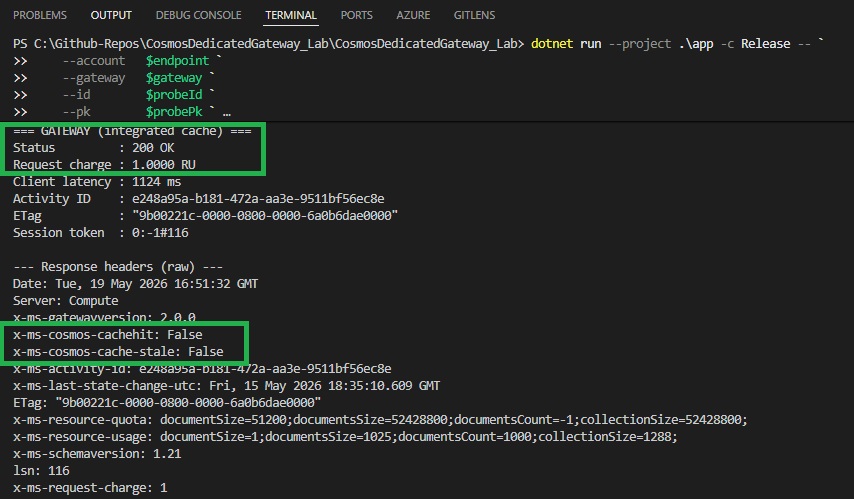
Looking at the response headers, the x-ms-cachehit: False status indicates that the document was not retrieved from the cache. We can also see the request charge of 1 RU for our point read operation which also confirms we did not hit the cache.
Run 2
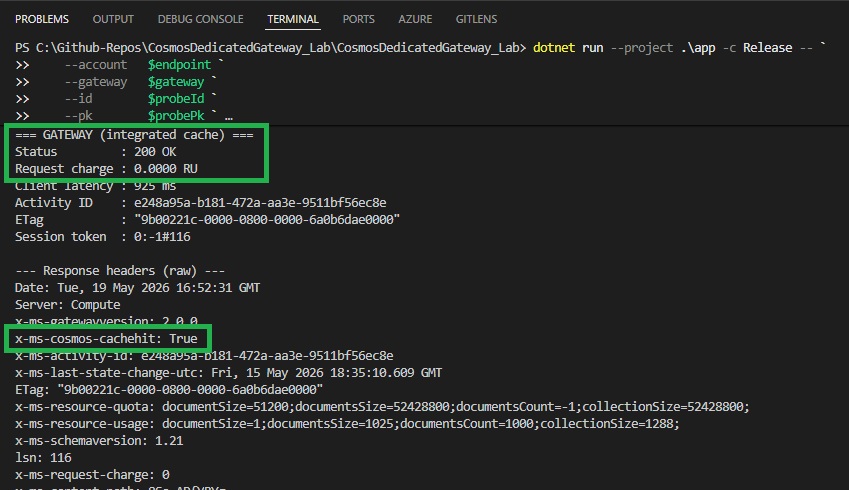
If we take a look at my second run, here we can see the x-ms-cosmos-cachehit value of True and our request charge was 0 RUs! This lets us know our read operation successfully read from the integrated cache resulting in a ZERO RU cost.
Tips for Developers
To maximize the benefits of the Azure Cosmos DB Dedicated Gateway and integrated cache while minimizing trade-offs, consider these approaches:
-
Identify Cache-Friendly Patterns: Analyze your application’s queries and reads to find caching opportunities. Target the hot items or repeat queries that drive high RU consumption and are suitable for eventual consistency. Route those through the dedicated gateway endpoint to leverage caching, while other requests can still use direct mode if needed (you can have a mix by using separate
CosmosClientinstances or adjusting per-request consistency). -
Use MaxIntegratedCacheStaleness Wisely: Tune the
MaxIntegratedCacheStalenessper request to balance freshness vs. cache hit rate. For data that doesn’t change often (or can tolerate being a few minutes out-of-date), using the default 5 minute staleness is suitable. Cosmos does not have a means to manually purge the cache and operates using the Least Recently Used (LRU) eviction policy. If this is a requirement, you should consider a different enterprise cache such as Redis. - Monitor RU Savings and Right-Size Throughput: After deploying a dedicated gateway, measure your RU consumption before and after enabling it for specific workloads. If you observe a significant drop in RU usage on the backend, consider lowering your provisioned RU/s or adjusting your autoscale range to realize cost savings. Conversely, if RU consumption doesn’t drop enough to justify the gateway’s cost, reconsider using it or try adjusting which operations go through the cache.
Final Thoughts
The Azure Cosmos DB Dedicated Gateway (with integrated cache) is a powerful tool for reducing RU consumption and improving read performance in the right scenarios. By offloading caching and query coordination to a dedicated compute layer, it can make frequently accessed data effectively free in terms of RU usage, enabling you to lower your backend throughput costs. However, it’s not a one-size-fits-all solution, you still pay for operations that aren’t cacheable, and you must weigh the gateway’s fixed cost and eventual consistency model against your specific workload needs. However, when used appropriately (for example, in read-heavy applications, high-frequency queries, or caching of reference data), the dedicated gateway provides clear architectural and cost benefits for developers and solution architects looking to optimize their Cosmos DB deployments.
Until next time!